
Laptops rarely stop working all at once. Instead, they slowly become frustrating. A delay here, a freeze there, a fan that suddenly sounds like it’s trying to escape the device. Most people ignore the early signs until the laptop becomes almost unusable. That’s usually when they start searching for ways to fix laptop issues quickly.
The truth is, many of these problems are fixable without spending a fortune or replacing your device. Understanding what’s going wrong and knowing when to act can save you both time and money. This guide walks through the most common laptop issues, what you can do yourself, and when it makes sense to get professional help.
The Early Warning Signs Most People Ignore
Before a laptop completely fails, it gives plenty of warning signs. The problem is that most users don’t notice them or choose to ignore them.
You might see programs taking longer to open, or your system struggling with tasks it used to handle easily. The battery might drain faster than before, or the device may heat up more than usual. Sometimes the keyboard becomes less responsive, or the screen flickers for a moment and then returns to normal.
These small issues often lead people to search how to fix laptop near me problems later, when the situation has already become worse. Acting early is always easier than dealing with a full breakdown.
Why Laptops Slow Down Over Time
A laptop that was fast when you bought it doesn’t stay that way forever. Over time, unnecessary files, outdated software, and background applications build up and affect performance.
Operating systems also become heavier with updates, meaning older hardware struggles to keep up. Storage drives, especially traditional hard drives, can slow down significantly as they fill up.
Many users assume their laptop is “old,” when in reality it just needs basic optimisation. Learning how to fix laptop screen near me performance issues can bring a slow device back to life without replacing it.
The Most Common Laptop Problems
Laptop issues usually fall into a few common categories.
Slow performance is the most frequent complaint, often caused by software clutter or insufficient memory. Overheating is another major issue, usually due to dust buildup or poor airflow. Battery problems can make the device unreliable, especially if it shuts down unexpectedly.
Hardware failures, such as damaged ports or faulty storage drives, are less common but more serious. Screen problems, keyboard faults, and charging issues also appear regularly.
Each of these problems has a solution, which is why searching how to fix laptop in uk issues often leads to practical and effective results.
What You Can Fix Yourself
Not every problem requires a technician. Some basic fixes can be done at home without much effort.
Restarting your laptop can solve temporary glitches. Removing unnecessary programs can improve speed. Updating your operating system and drivers can fix compatibility issues. Running antivirus software can remove hidden threats affecting performance.
These simple steps can solve many issues and are often the first stage when trying to fix laptop problems on your own.
When DIY Stops Being Enough
There’s a point where basic fixes no longer work. If your laptop continues to crash, overheat, or fail to start, the issue is likely more serious.
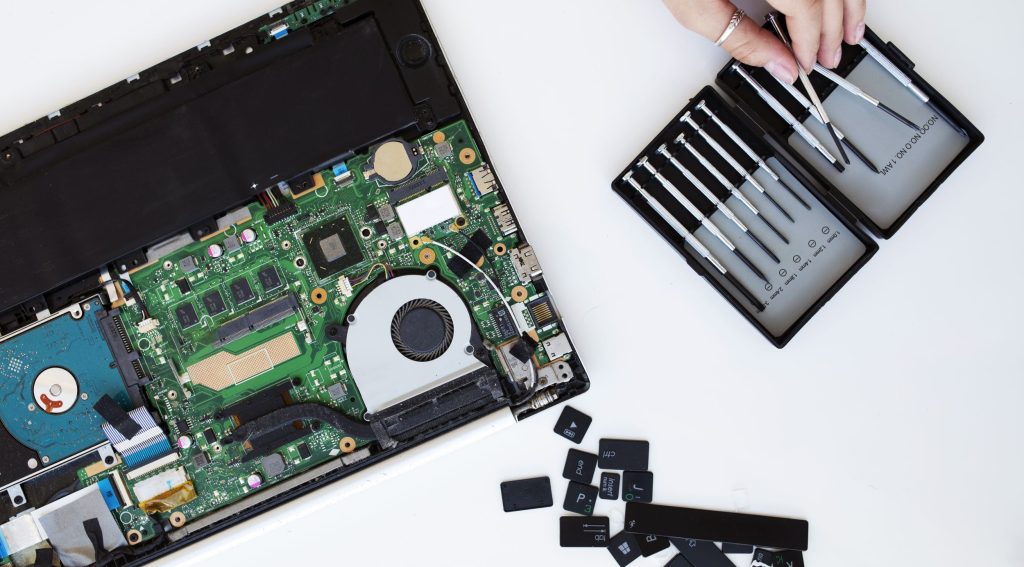
Hardware repairs, such as replacing internal components, require proper tools and experience. Attempting these without knowledge can cause more damage. Data loss is another risk if the problem involves storage devices.
This is usually when people move from trying to fix laptop keyboard issues themselves to looking for professional support.
Professional Laptop Repair: What Actually Happens
Taking your laptop to a technician is often simpler than people expect.
The process starts with a diagnostic check to identify the exact problem. Once the issue is confirmed, the technician explains the repair options and provides a cost estimate. After approval, the repair is carried out using suitable tools and parts.
Most laptop repair services in the UK can handle common issues within a day or two. For more complex problems, it may take longer depending on parts availability. Professional help ensures that your attempt to fix laptop issues doesn’t turn into a bigger problem.
Cost vs Replacement: The Reality
One of the biggest mistakes people make is replacing their laptop too early.
In many cases, a repair costs far less than buying a new device. Upgrading certain components, such as storage or memory, can significantly improve performance at a lower cost.
Even hardware repairs are often more affordable than expected. Before replacing your device, it’s worth exploring options to fix laptop issues through repair or upgrades.
Small Upgrades That Make a Big Difference
Sometimes, the best way to fix a laptop isn’t repair, it’s improvement.
Replacing a traditional hard drive with an SSD can dramatically increase speed. Adding more RAM allows smoother multitasking. Cleaning the internal system can reduce overheating and improve performance.
These upgrades are often recommended by technicians when users want to fix laptop performance rather than replace the entire device.
How to Avoid Future Problems
Once your laptop is working properly again, keeping it that way is important.
Regular maintenance can prevent many issues. Keeping your system updated, avoiding unnecessary software, and protecting against viruses all help maintain performance. Using your laptop on a flat surface improves airflow and prevents overheating.
Simple habits like these reduce the need to repeatedly search how to fix laptop black screen problems in the future.
Choosing the Right Repair Service
If you decide to seek professional help, choosing the right service matters.
Look for technicians with good reviews, clear pricing, and experience. A reliable provider will explain the issue in simple terms and offer a fair quote before starting any work.
Avoid services that promise instant fixes without proper diagnosis. A careful approach ensures your fix screen laptop process is handled correctly.
The Smart Approach to Laptop Problems
The biggest difference between people who constantly struggle with laptops and those who don’t is how they respond to problems.
Ignoring issues leads to bigger failures. Acting early leads to simple fixes. Understanding basic maintenance helps avoid unnecessary repairs.
Instead of reacting only when your device stops working, taking a proactive approach makes it easier to fix laptop charging port issues before they become serious.
Conclusion
Laptop problems are frustrating, but they are rarely the end of your device. Most issues can be solved with the right approach, whether through simple fixes, upgrades, or professional repair.
By understanding common problems and acting early, you can extend the life of your laptop and avoid unnecessary costs. Learning how to fix laptop issues properly gives you more control over your device and helps you get the most out of it.
FAQ’s
fix laptop services include repairing hardware issues, fixing software errors, and improving system performance.
Basic fix laptop services start from around £30 and can go higher depending on the issue.
Minor issues can be solved, but complex problems require professional fix laptop services.
Most fix laptop repairs are completed within 24–48 hours.
If the device is usable, it’s usually better to fix laptop instead of replacing it.